What it compares to
| Excel and folders | Ready-made project software | Application built this way | |
|---|---|---|---|
| Setup | instant, but no two setups alike | weeks, modules one by one | built around your workflow |
| What a language model sees of it | nothing, unless someone pastes it in | raw data through an interface, expensive per question | a ready project status, directly readable |
| You pay | nothing extra | a license per user, modules one by one | development once, operation by usage |
| One more employee | costs nothing | costs extra | costs nothing |
| Your data sits | in your folders | with the vendor | in your account |
| If you switch | files stay | access ends | keeps running, without us |
What the demonstrator shows
A complete application in the browser: customers, projects, tasks, hours, contacts, conversation notes, an idea list, a glossary. Sign-in with a Google account.
Every project gets its own folder in the file storage on creation, with a fixed structure.
On every change, the project status is written as a text file into the same folder, plus an overview of all projects.
Claude answers questions solely from these files, including the question of why a task is stuck. The answer sits in a conversation note, not in a report.
What you can connect
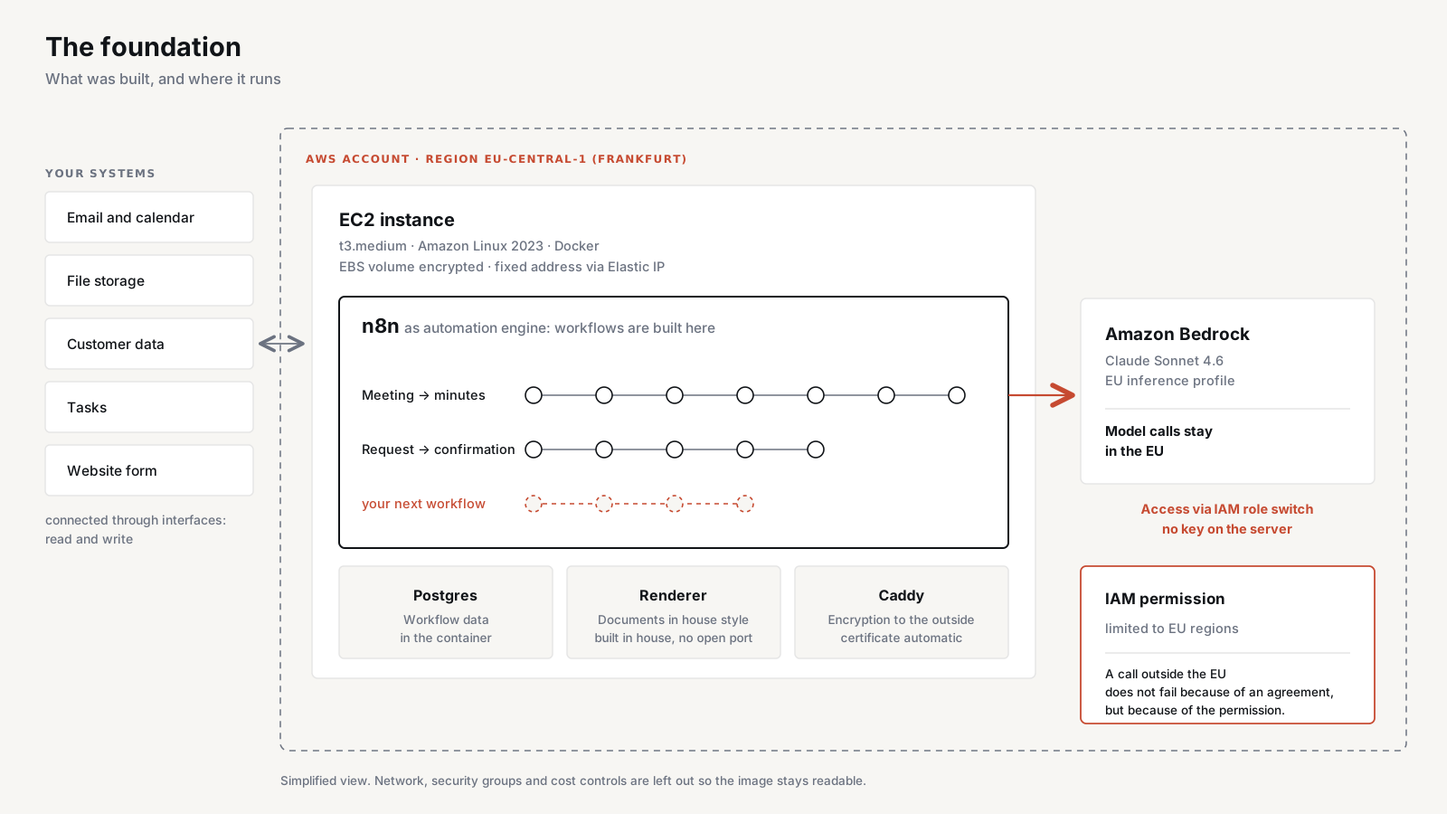
The application itself connects in a few places, and each one can be swapped. The second side is more interesting: the language model sits next to the application, not inside it. Whatever is connected there can work with the project status.
On the application
| Area | Examples |
|---|---|
| File storage | Google Drive, SharePoint, OneDrive, Nextcloud, S3 |
| Database | Postgres, as a managed service or in-house |
| Sign-in | Google Workspace, Microsoft 365 |
On the model beside it
| Area | Examples |
|---|---|
| Email and calendar | Google Workspace, Microsoft 365 |
| Customers and sales | HubSpot, Pipedrive, Monday, Salesforce |
| Accounting | DATEV, BMD, sevDesk, lexoffice |
| Communication | Slack, Teams |
| Tasks and tickets | Asana, Jira, Zendesk |
| Files and knowledge | Drive, SharePoint, Confluence, Notion |
Examples of systems with an open interface, not ready-made integrations.
Connected in the demonstrator: Google Drive and the Google sign-in on the application, and Claude through its access to the Drive. Mail and calendar come with Claude itself. The tool brings them, nothing had to be built.
- Follow-up email after a call: the history is already in the project status.
- Quote draft from a project's scope and duration.
- Monthly invoice from the booked hours, in house style.
- Meeting suggestions: open tasks against free calendar slots.
- Weekly report per customer, without anyone putting it together.
- Workload: who has room next week, where things pile up.
- Handover: everything about a project in one document, for vacations or changes.
- Onboarding: new people ask their way into a project instead of searching.
None of these needs an extension to the software. The project status is ready as a file. What becomes of it is up to the tool next to it.
What it costs
We build it for you. The demonstrator is the foundation. That saves most of the development time, and the real work is fitting it to your workflows.
After that, the application runs in your account: database and storage by usage, model calls by usage. No license per user, no modules unlocked separately. One more employee costs nothing. Support and further development on request.
How it is built
An application in the browser, sign-in with a Google account. A Postgres database underneath. When a project is created, its folder in the file storage appears automatically, with a fixed structure.
When someone changes something (books hours, moves a task, writes a note), the database remembers that this project has changed. A background process checks this every minute and writes a text file for each affected project into its folder.
These files are created without a language model. It is formatting: data from the database poured into a fixed template, always the same order, always the same headings. Each one starts with a header that says where it comes from and how old it is.
Why it runs reliably
The same data always produces the same file. Nothing is left out, summarized or reworded. That is exactly what would happen if a model wrote the file.
The database stays the single source of truth, the file is derived from it. There is no second data set that can drift apart. If the file is lost, the next run creates it again. Timestamp and version number are inside. You can see whether the status is current instead of assuming it.
Where AI works, and where not
There is no AI inside the software. No chat window, no suggestions, no automation.
The model works next to it: it reads the generated Markdown file (.md) and names its source. It writes nothing back and makes no decisions. That makes it replaceable by any other model without changing anything in the application.
The obvious route would be to let the model query the database directly. Then it assembles every answer from single queries, the context grows with each one, and past a certain size the earliest material drops out as new material comes in.
Figures from the comparison
~6,400instead of ~16,000
Tokens per question: Markdown file (_snapshot.md) versus direct database access
measuredClaude Sonnet 4.5, AWS Bedrock, sample data, three runs per variant.
3/3instead of 0/3
Runs with a complete answer: Markdown file (_snapshot.md) versus direct database access
measuredSame measurement as above.
What this means for you
If you need an application a language model can work with right away, the setup for it is built and ready to demo. What turns it into your solution is the fit to your workflows.
We show you the demonstrator in a call.